
The Importance of Error Messages
Look. It's easy to pick on the big guys. I'm talking about the websites with lots of money and tons of traffic. We expect them to cross all of their "t"s and dot all "i"s and be super-professional. These sites have achieved successes that many aspire to reach; they're profitable, popular, useful. They can't always live up to our expectations. However, this is ridiculous.

That's a real error message received during a recent Twitter outage.
I get it. They were trying to automate reporting for when the site has hiccups. No matter how large your staff or server farm is, things are going to go wrong from time to time. Having a plan in place is admirable. But when your plan produces output like that, it's time to go back to the drawing board.
I get it. They were trying to automate reporting for when the site has hiccups. No matter how large your staff or server farm is, things are going to go wrong from time to time. Having a plan in place is admirable. But when your plan produces output like that, it's time to go back to the drawing board.
Read on to find a list of common web server errors and how you should approach error reporting on your website.
Web servers allow you to display custom error messages depending on the type of error received. Below, we've listed some of the most common error types and best practices on how to advise and reroute your users for a successful experience.
Common Error Message Types:
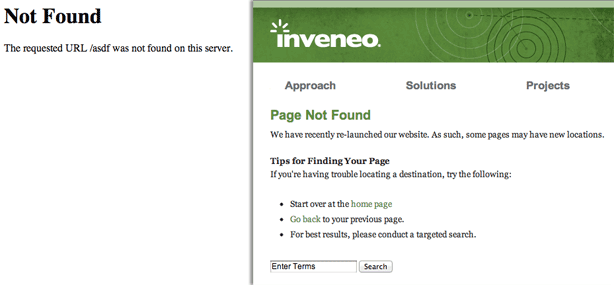
404 Errors: This is when a web page cannot be found. Compare the default 404 page in Google Chrome with a custom 404 error page by one of our clients, Inveneo. Inveneo gives an apology and solutions to finding the proper file while wrapped in the full site branding.
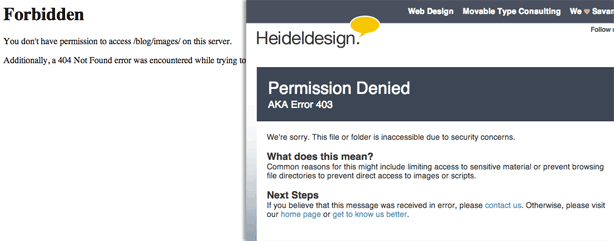
401 & 403 Errors: These are received when a folder or file on a web server is inaccessible due to privacy settings. Again, compare the default 403 error with the one served on this website, Heideldesign.com.
There are many other errors to consider. From generic issues with script processing (Error 500) to custom application failures, audit your website and listen to feedback from your visitors and clients. They're usually very quick to let you know when they're experiencing problems. Use that information to structure your error message checklist.
If you're interested in learning more about this topic and how error messages may improve your site, let's talk.