Asset Management with Movable Type
 One of our favorite features of Movable Type is how assets are handled.
Let us help you explore how easy it is to take control of your images to create dynamic galleries and use the "upload once - create multiple versions" functionality in MT 4.
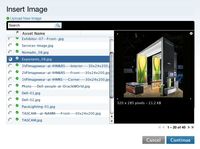
In MT parlance, assets are files that you've uploaded to the web server using the Movable Type interface. For most of our clients, that means images: Photos, renderings and illustrations of all kinds. No matter how good your written content is, sometimes that extra push it needs to be noticed can only come from a visual stimulus. So, it's great that Movable Type makes uploading, categorizing and finding those visuals intuitive and easy.Once you've uploaded a file (through the "Upload file" menu option or through the rich text editor when creating an entry) you can give your image a title, description and tags. Tags are one to two word short descriptions that best sum up the content. For a photograph of a landscape, your tags might be: photograph, color, landscape, grass, trees. Then, if you're looking for all of the images you've uploaded to your site that contain "trees", it's one click away.
But the best part of asset management with Movable Type 4 is using the auto-generated resizing options to create on-the-fly thumbnails and apply custom cropping to images directly from the templates. On a recent project for Lowcountry Exhibits, Heideldesign leveraged that power to make adding a multitude of different image sizes, crops and effects a one-step process for the client. All they have to do is upload a single photo once.
From there, Movable Type and the custom template set does the rest. On the home page, a custom template creates an XML feed for the scrolling Flash interface with auto-resized and cropped thumbnail images from the first asset on each entry in the "portfolio" category. On the Entry Listing templates, a different thumbnail is created on the fly. For the Entry templates, three different image sizes are created automatically: A medium thumbnail, a small thumbnail and a large javascript-triggered lightbox overlay.
And all the author has to do is upload one image into their Movable Type entry.
Not only is it a huge time saver for the author, it's a great solution for the designer and developer as well. They never have to worry about a design "breaking" due to a mis-sized image. Pixel-level control can be maintained throughout the templates.
If you have a graphic-intensive project and want to learn more about how Movable Type's asset management may be able to help you, contact Heideldesign today for a free consultation.